
How to Manage Your Subscription
Compare plans, switch between monthly and yearly billing, upgrade or downgrade, and manage billing for your organization.
Subscription settings are where you choose and manage your organization's plan and billing. It is per organization, so each workspace has its own plan.
Who can change this
Billing is managed by the Owner. Changes apply to the whole organization.
Open Subscription settings
In the sidebar, open Settings and select Subscription.
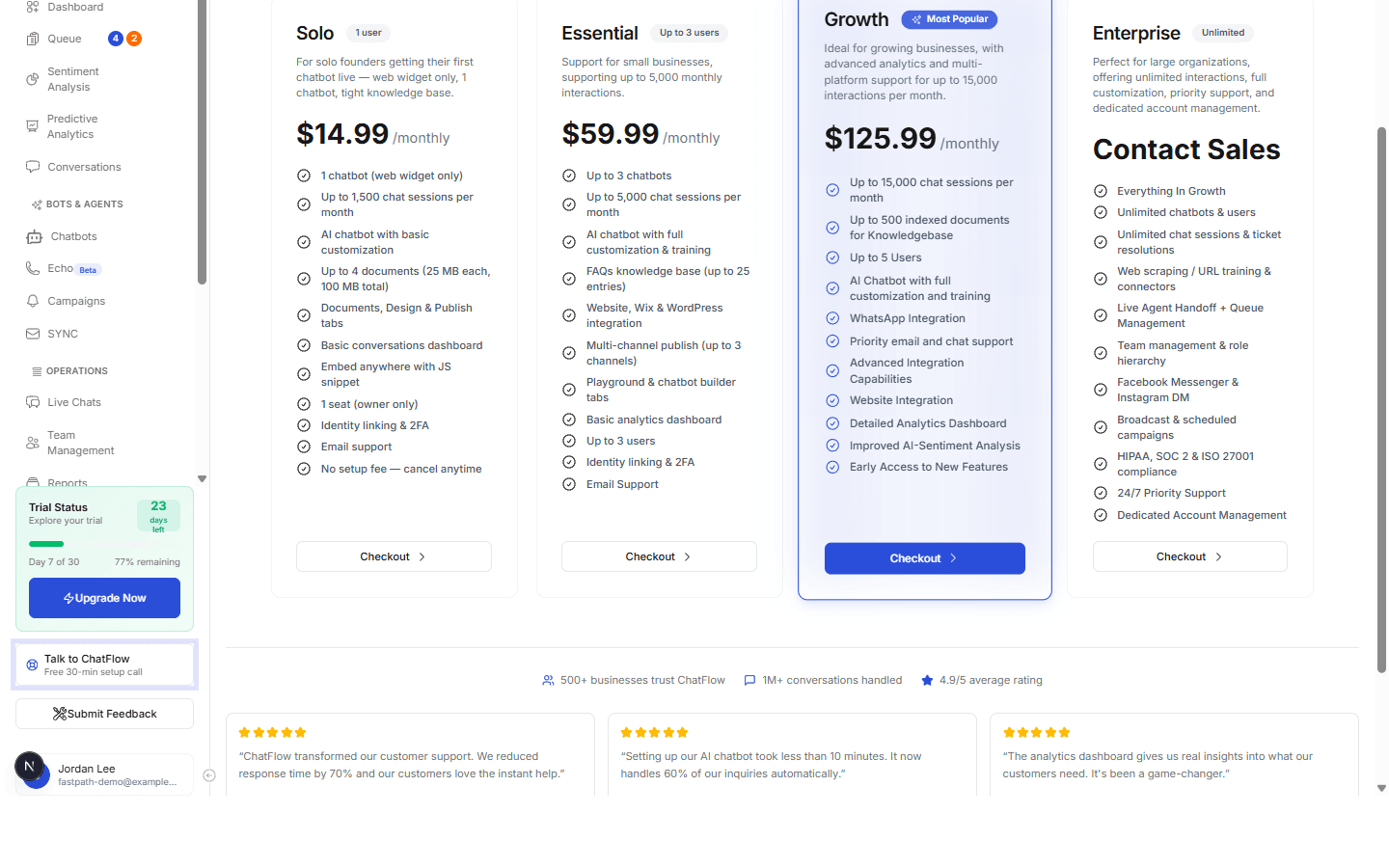
Compare plans
ChatFlow has four plans, each card lists what is included:
| Plan | Best for |
|---|---|
| Solo | A single user getting one chatbot live with the essentials. |
| Essential | Small teams that need a few users or WhatsApp. |
| Growth | Growing teams that want social channels, cited answers and answer quality controls. |
| Enterprise | High volume and advanced features like Campaigns, Predictive Analytics, Queue Management, and API connections. Select Contact Sales. |
What Growth adds for answer quality
Growth and Enterprise include cited answers (the document, section and page behind every reply), approved sources only, answer ratings with the Answer Quality tab, document versions, the AI disclaimer and the chat timeout. If your plan does not include them the settings tabs stay visible and show an upgrade prompt, and anything you configured earlier is kept for when you upgrade. See Answer Quality.
Choose a billing cycle
Use the Monthly / Yearly toggle above the plans. Yearly billing saves compared with monthly, the saving is shown on the toggle and on each plan.
Upgrade, downgrade, or check out
Pick your plan
Select the billing cycle, then the plan that fits.
Check out
Select Checkout on that plan to start or change your subscription. For Enterprise, select Contact Sales.
Every plan is covered by a 30-day money-back guarantee, you can cancel anytime, and you can export your data with no lock-in. Not sure which plan fits? Use Book a free setup session at the top of the page.
Verify it's working
- After checkout, return to Subscription and confirm your current plan is shown.
- Confirm any plan-gated features (for example Integrations Enterprise features) are now unlocked.
Troubleshooting
Features are still locked after upgrading
Give billing a moment to confirm, then refresh. If a feature stays locked, check you upgraded the right organization (billing is per organization) and that checkout completed.
I need to cancel or change payment details
Manage these from Subscription settings. Cancellation keeps your plan active until the end of the current period, and the 30-day money-back guarantee applies from settings.