
How to Manage Agent Settings
Set each agent's chat capacity, priority, assigned chatbots, working hours, and availability from Team Management.
Before you begin
Agent settings control how each team member handles live chats: how many at once, which chatbots they cover, when they work, and whether they are currently accepting chats. You manage all of this from Team Management.
Open Team Management
- Select Team Management in the sidebar (under OPERATIONS).
- Choose a member from the Members list to open their settings.
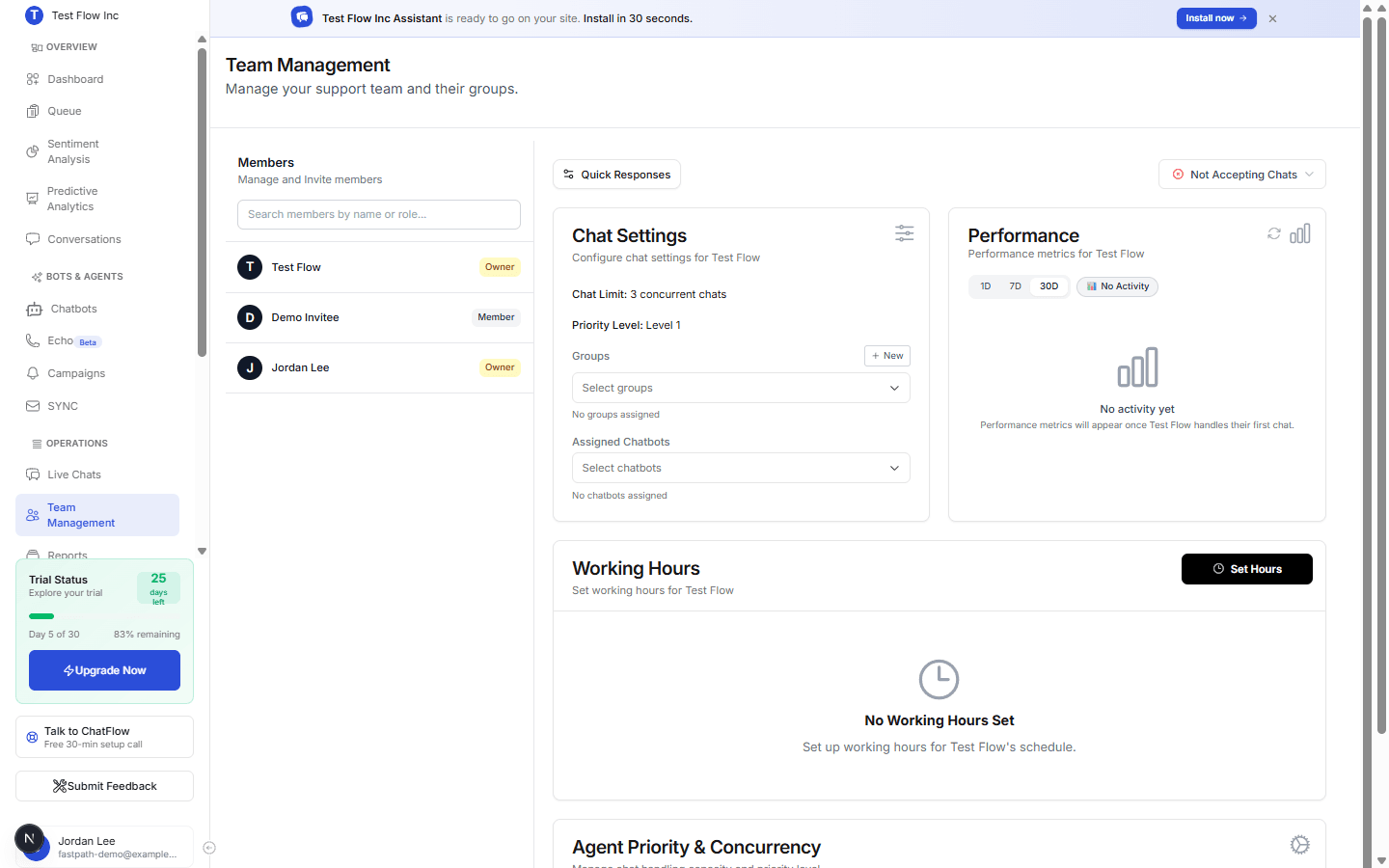
Configure an agent
With a member selected, you can set the following.
Chat Settings
| Setting | What it does |
|---|---|
| Chat Limit | The number of concurrent chats this agent can handle at once. When they hit the limit, new chats go to other available agents or wait in the queue. |
| Priority Level | How early this agent is picked when chats are assigned. |
| Groups | Organize agents into groups. Select + New to create one. |
| Assigned Chatbots | An optional filter for which chatbots this agent covers. Leave it empty and they handle every chatbot; add specific ones to restrict them to only those. |
Working Hours
Select Set Hours to define the days and times this agent is available. With no working hours set, the agent is not scheduled as available.
Availability
Each agent has an Accepting Chats / Not Accepting Chats status (top right). An agent must be accepting chats, within their working hours, and under their chat limit to receive new conversations.
How assignment works
When a customer asks for a human, ChatFlow routes the chat to an agent who is accepting chats, within working hours, under their chat limit, and covers that chatbot (their Assigned Chatbots list is empty, meaning all bots, or includes this one), taking priority into account. If no one is available, the chat waits in the queue.
This is the automatic routing. A manager (Account Manager or above) can also hand a chat to a specific agent by selecting it in the conversation, which checks the agent's availability and limit but not their chatbot filter. See Assign Chats.
Verify it's working
- Set an agent to Accepting Chats and assign them the chatbot you are testing.
- From the chatbot's Playground or live site, request a human.
- Confirm the chat reaches that agent in Live Chats, and that a second chat respects the chat limit.
Troubleshooting
An agent is not receiving chats
Confirm they are set to Accepting Chats, are within their working hours, and are not already at their chat limit. If their Assigned Chatbots list is not empty, make sure it includes the chatbot the request came from (an empty list covers all chatbots).
Chats go to the wrong agent
Check Assigned Chatbots and Priority Level for each agent. An agent with a non-empty list only receives chats from the bots in it (an empty list means all bots), and higher-priority agents are picked first.