
How to Set the Chat Timeout
Choose how long a website chat stays open when a visitor stops replying, or switch automatic closing off for this chatbot.
Before you begin
A website chat that sits idle is eventually closed, which is what turns it into a completed conversation in your reports and offers the visitor the end-of-chat rating. How long that takes is yours to set, per chatbot.
Longer suits considered decisions, where someone reads a document and comes back. Shorter suits quick questions and keeps your conversation numbers tidy.
Plan availability
Chat Timeout is available on the Growth and Enterprise plans, and during the free trial. It applies to the website chat. WhatsApp, Instagram and Messenger use their own timeouts.
Set the timeout
- Go to Chatbots, open your chatbot, click Settings, then Chat Timeout.
- Leave Close idle chats automatically on.
- Choose Platform default, or select Custom and enter the minutes you want (1 to 1440, which is 24 hours).
- Select Save changes.
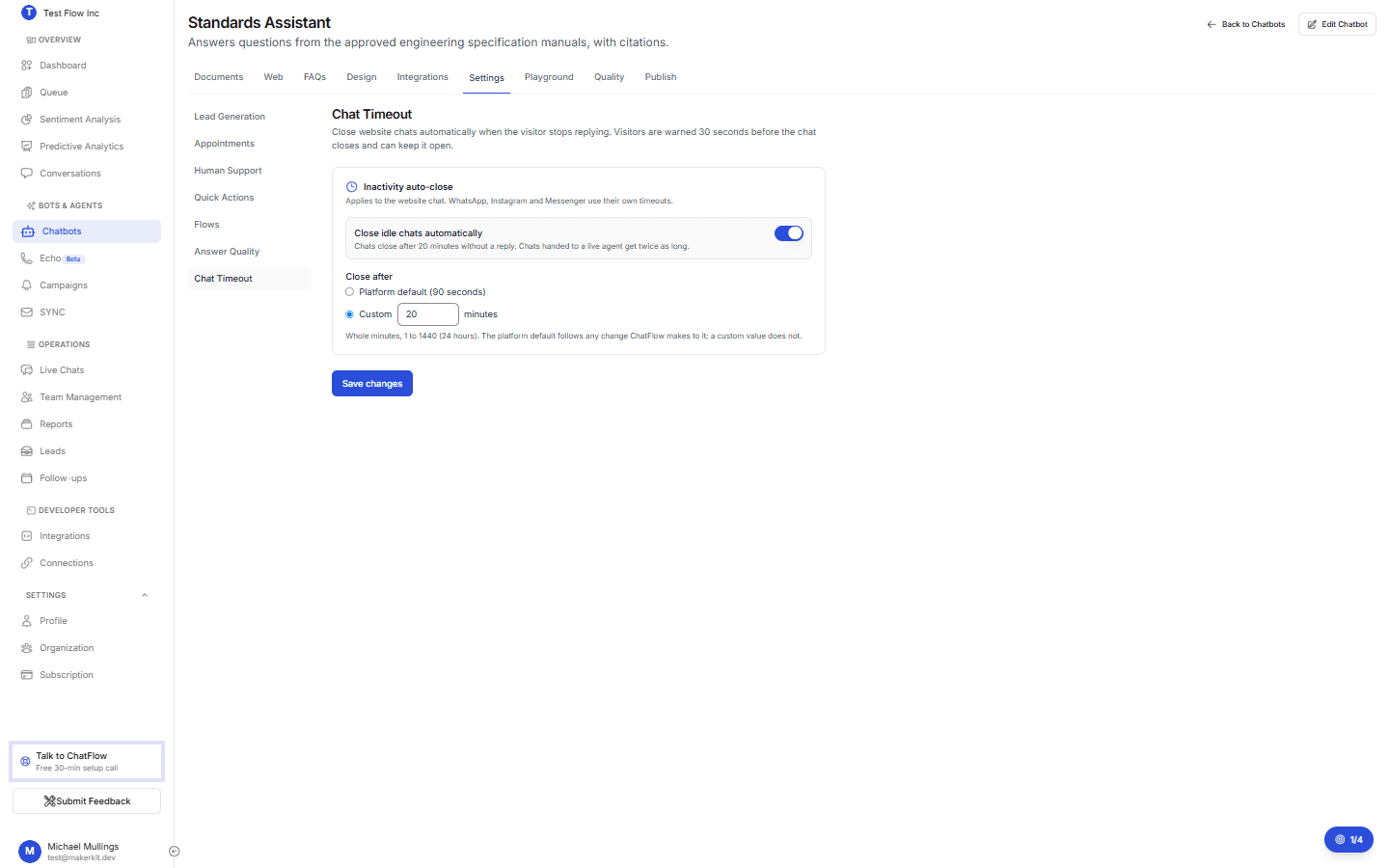
The card tells you what will happen in plain words, for example "Chats close after 20 minutes without a reply."
Visitors are warned first
Nobody is cut off silently. Thirty seconds before the limit the visitor is warned and can keep the chat open, which also satisfies the accessibility requirement for timed interactions. Chats handed to a live agent get twice as long, because an agent often asks the customer to go and check something.
Switching automatic closing off
Turn Close idle chats automatically off when chats should stay open until someone ends them deliberately.
Two consequences worth knowing:
- Those chats are not counted as abandoned, and the end-of-chat rating is not offered automatically.
- They stay open in your Live Chats and reports until a visitor or an agent closes them.
Verify it's working
- Set a short custom timeout, for example 2 minutes, and save.
- Open your chatbot on your site, send a message, then leave it alone.
- About thirty seconds before the limit the warning appears, and at the limit the chat closes with the end-of-chat screen.
- Put your real timeout back.
Troubleshooting
Chats still close at the old time
The widget picks the timeout up when the page loads. Reload the page the chatbot is embedded on, then start a fresh chat.
The timeout I set is being ignored
If the organization's plan no longer includes Answer Quality, the website chat falls back to the platform timeout and your saved value is kept for when you upgrade. This is deliberate: the chat and the server always agree on one number, so nobody is cut off earlier than they were told.
A chat closed while the visitor was reading
Raise the timeout. Reading a long answer, or a document the assistant cited, easily takes longer than a few minutes.
The tab is locked
Chat Timeout is part of Answer Quality, a Growth and Enterprise feature. On lower plans the tab stays visible and opens an upgrade prompt.