
How to Create Conversation Flows
Set always-on behavior rules, custom rules, and flow instructions that guide exactly how your chatbot handles conversations.
Before you begin
Conversation Flows give you direct control over how your chatbot behaves, beyond what it learns from your content. You combine always-on behavior rules, your own custom rules, and free-form flow instructions, and the AI follows all of them in every conversation.
Plan availability
Conversation Flows are available on the Growth and Enterprise plans, and during the free trial.
Open the Flows tab
- Go to Chatbots in the sidebar and open your chatbot.
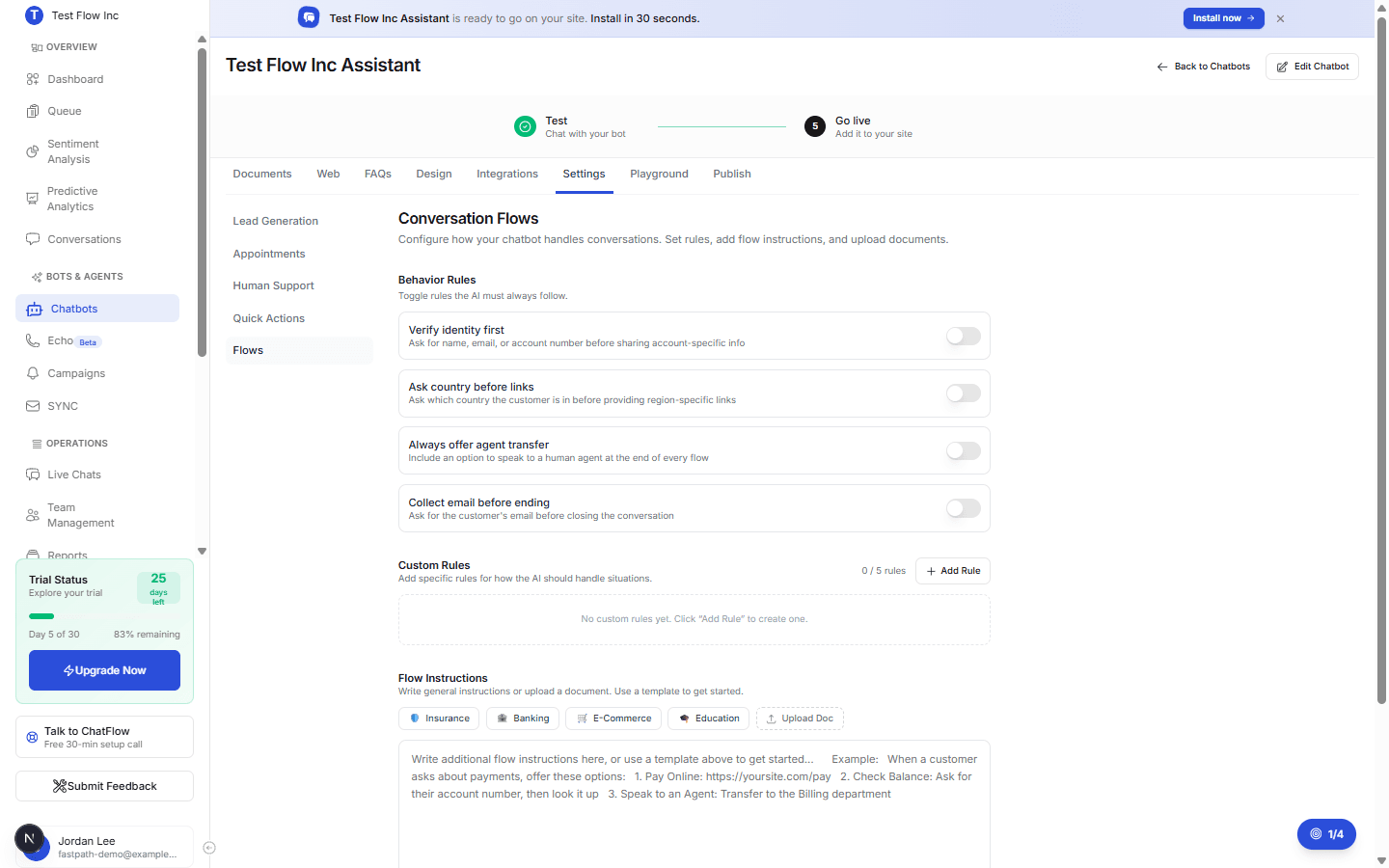
- Click the Settings tab, then select Flows.
Build your flow
Set behavior rules
Behavior Rules are always-on instructions the AI must follow. Turn on any that apply:
| Rule | What it does |
|---|---|
| Verify identity first | Ask for a name, email, or account number before sharing account-specific information. |
| Ask country before links | Ask which country the customer is in before giving region-specific links. |
| Always offer agent transfer | Include an option to speak to a human at the end of every flow. |
| Collect email before ending | Ask for the customer's email before closing the conversation. |
Add custom rules
Custom Rules handle specific situations, you can add up to 5. Select Add Rule, give it a name (for example, Payment questions), and describe exactly what the AI should do, including any links or steps. For example: list the ways to pay, how to check a balance, and when to transfer to billing.
Write flow instructions
Use the Flow Instructions box for general guidance. To start faster, apply an industry template (Insurance, Banking, E-Commerce, or Education) and edit the details, or select Upload Doc to import a document whose text is added to the instructions.
Templates replace the instructions text
Applying a template overwrites whatever is in the Flow Instructions box. Your behavior toggles and custom rules are not affected.
Save
Select Save Conversation Flows. Flows take effect as soon as you have at least one toggle, rule, or instruction saved.
How it affects the chatbot
In every conversation, the AI follows your behavior toggles as mandatory rules, applies your custom rules to the situations they describe, and uses the flow instructions as its overall script, all on top of its knowledge base.
Verify it's working
- Open the Playground tab.
- Trigger a rule you set, for example ask for account information to test Verify identity first.
- Confirm the chatbot behaves the way you configured.
Troubleshooting
A rule is not being followed
Make sure you selected Save Conversation Flows (and Save Rule for a custom rule). Empty rules are not saved. Then retest in the Playground.
A template wiped my instructions
Applying a template replaces the Flow Instructions text by design. Re-apply the template, then edit from there, or paste your own instructions back in. Your toggles and custom rules are untouched.